|
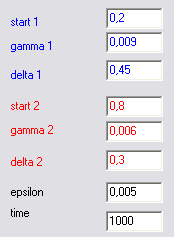
- The input fields for blue and red compartment:
- start - the start volume for compartment
- gamma - continuous saturation of compartment
- delta - proportional decrease of compartment volume after spike arrival
- epsilon - the maximal value for compartment volumes to be considered as an equal
- time - the length of simulation
|
|
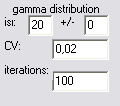
- isi - inter-spike interval of gamma distribution of input pattern
- +/- isi randomization of input patter
- cv - coefficient of variation of gamma distribution of input pattern
- iteration - multiple generation of input patterns by above criteria
|
|
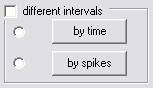
- different intervals - enables different criteria (isi and CV) of one input pattern
- by time - enable definition of different criteria by time (number of steps)
- by spikes - enable change of criteria after optional number of generated events (spikes)
|
|
- generation of input pattern - one train
|
|
|
- simulate! - start simulation
- pause - pause simulation (enable only during simulation)
- stop - stop simulation (enable only during simulation)
|
|
- count! - compute the simulation and display the results (without graphic trace)
- process all - computes multiple input patterns (defined in iteration field)
|
|
- speed - adjusts the speed of simulation (can be changes during the simulation)
|
|
- graphic trace - enables/disables the graphic trace
|
|
graphics during simulation |
- current volumes representation
|
|
- current volumes of compartments
|
|
- difference between compartment volumes
|
|
- input (lower) and output (upper) pattern, events (spikes) are displayed as the lines
|
|
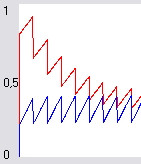
- graphic representation of compartment volumes during simulation (by time)
|
|
- s - number of input spikes
- f - number of output (fired) spikes
- q - ration s/f
|
|
- coefficient of variation of input pattern
|
|
|
- Read... - reads the file as an input pattern (comma separated occurrence of spikes)
- ReadMulti ... - reads the file with multiple inputs (potentially saved by the program)
|
|
- Save... - saves the current output spike train to file
|
|
- ask file - asks for filename before saving
- del - deletes file before writing
|
|